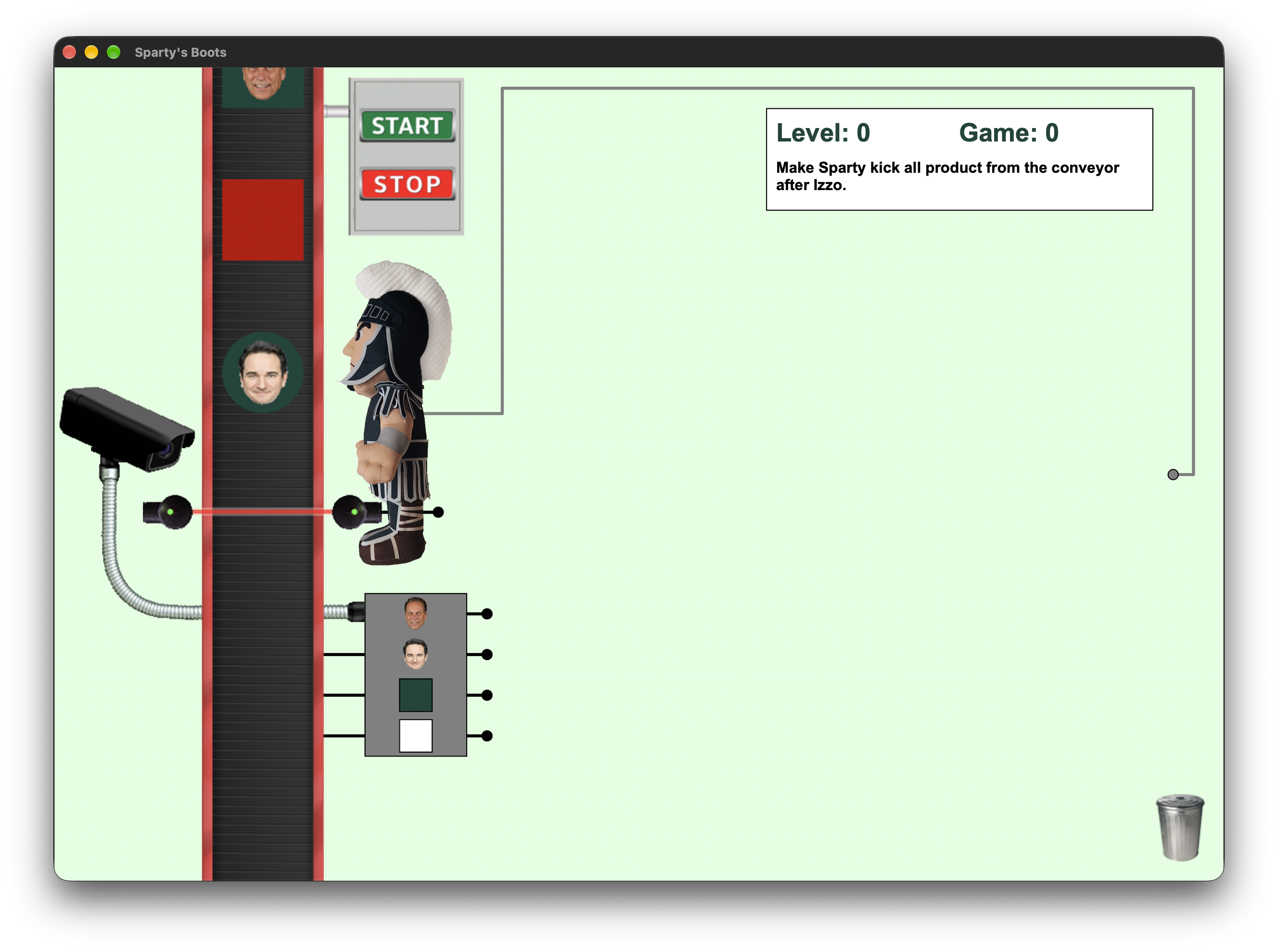
Sparty’s Boots takes inspiration from Rocky’s Boots and gives the logic-circuit game a Michigan State theme. Products move down a conveyor, and the player builds a circuit to decide which ones Sparty should kick. A sensor can report a product’s properties, a beam detects its presence, and logic gates turn those signals into an action. Getting the right answer means getting the timing right, too.
Our five-person team built it for CSE 335 using C++17 and wxWidgets. Over six sprints, I worked on the drawing and coordinate system, interactive wiring, SR and D flip-flops, and editing tools. I also helped plan tasks, coordinate changes to shared code, and review teammates’ work.
See the game in action
A puzzle you build before you run it
Products combine shape, color, and sometimes content. The player connects sensor and beam outputs through gates, then into Sparty. Early puzzles use direct connections and combinational logic; later ones introduce memory through SR and D flip-flops. The circuit has to choose correctly as products reach the beam and pass the kicking point.
The assignment supplied six levels to reproduce, and our team created two more. A teammate owned the custom-level tasks. The levels are defined in XML, separating their geometry, products, instructions, and scoring from the game code. That let the same system support progressively more involved puzzles.
Getting five people’s work to fit together
I helped break the assignment into work we could build in sequence. Drawing, window scaling, and level loading had to come first. Wiring depended on those foundations, and gameplay depended on the circuit working. We planned the sprints around that order, leaving the final stretch for integration and fixes.
I took a turn as sprint lead and helped scope development and review tasks in Trello. In the later sprints, each person had two development tasks and two reviews. We included tests in the definition of done and tried to keep closely related classes with one owner, so it was clear who needed to agree on an interface.
Most of my teammates were unfamiliar with Git, so I chose to keep us on a shared main branch rather than introduce several branches while they were learning. We divided the work by class and feature, agreed on ownership, and coordinated changes to common files. That division worked: we did not run into merge conflicts.
I also reviewed level loading, scoring and progression, deletion, and the final interactions. If a gate disappeared but left connections behind, or a feature did not behave correctly in play, I asked for the specific fix before approving it. The review had to follow what happened in the game.
Make clicks land where the player expects
In Sprint 2, I connected the game to the window’s painting and resizing. Levels use virtual coordinates, so resizing the window should scale the scene without changing its layout. Mouse positions need the reverse conversion. I implemented both sides so an object drawn in one place could still be clicked there after a resize.
In Sprint 4, I worked on gate pins, hit testing, and dragging wires from outputs to inputs. Pins needed to move with their gates. An output could connect to several inputs, but each input could have only one source. I checked reconnections, cancelled drags, and drops over empty space as well as successful connections. A player should be able to change their mind without leaving a broken wire behind.
When the circuit needs to remember
In Sprint 5, I implemented the SR and D flip-flops for the later levels. Their behavior depends on retained state: the SR gate can set, reset, or keep its output, while the D gate captures a value on a zero-to-one clock transition. The game also represents Unknown alongside One and Zero, so ordinary Boolean logic was not enough.
Restarting a conveyor run needs to reset that state while preserving the player’s wires. Feedback circuits added another challenge because stored values and current signals have to be handled in the right order. A circuit can look correctly connected and still behave incorrectly if its state changes at the wrong point in the frame.
The finished game updates each frame in a defined order: move products, sample detectors, evaluate the circuit, update Sparty, then score. That order matters because the circuit needs to respond to the product currently at the beam.
Let players change their circuit
For the final sprint, I added trash-bin deletion and a wire control-point view. Dragging a gate into the bin removes its connections and cancels any affected drag. Double-clicking an input pin disconnects its incoming wire, so the player can revise a circuit without restarting the level.
The optional control-point view shows the actual Bézier points and guides used to draw wires. It gave us a way to inspect the geometry behind both established connections and the wire being dragged. I also worked through clipping behavior so drawing stayed within the playing area.
Eight levels, completed and submitted
Near the deadline, we tested full circuits and compared the gameplay with the instructor’s version. That caught issues isolated tests could miss: flip-flops needed to reset correctly on restart, feedback had to preserve the right state, and a kick animation had to actually kick the product.
We completed and submitted the project. Final verification covered gameplay through Level 8, Windows animation, and a clean-checkout build. The November 2 build and test run reported 88 passing tests across 19 suites.
I came away with experience on both sides of a team project: writing the interactions and stateful gates, and helping organize the tasks and reviews needed to finish the game. Seeing all eight levels working together was the result of that shared effort.
Explore Sparty's Boots
- C++17
- wxWidgets
- Object-Oriented Design
- GoogleTest
- CMake